RepairKeys
Rarity-tiered consumable keys that repair gear of matching rarity, opens a custom 3-slot GUI where one unit of vanilla repair material restores 25% of an item's durability, and each repair burns a use off the key.
RepairKeys is a gear-progression plugin built around rarity-tagged items and rarity-matched keys. By default the config ships three tiers, Epic (purple), Legendary (gold), Mythic (red), but any tier name can be added through config or in-game.
Tagged items carry their rarity as the last line of their lore. Keys are tripwire-hooks renamed and recoloured to their tier, with a Uses: X/Y lore line that counts down with each repair. Repairing a tagged item requires a key of the same tier; rarity mismatches simply do nothing.
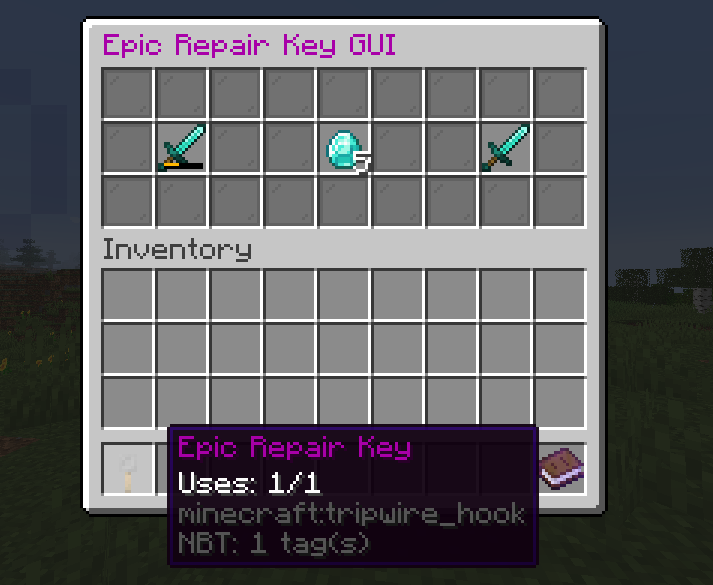
An Epic Repair Key in use, diamond sword (input) plus diamond (material) → repaired sword (output).
A player holding a key runs /rkgui, which opens a 27-slot inventory titled with the key's name. All slots are filled with grey-stained-glass-pane spacers except for three input/output positions:
slot 10: the damaged item to repair (must be a rarity-tagged item)slot 13: the repair material (vanilla repair material for that item type)slot 16: the output preview, populated automatically when both inputs are valid
Each unit of material in slot 13 restores 25% of the item's max durability. The output preview updates live as the slots change. Picking up the output (or shift-clicking it to inventory) consumes the inputs, decrements one use from the key, and finishes the repair. If a stack of material is more than enough to fully repair, only the units actually needed are consumed; the remainder stays in the slot.
When the key's last use is spent, it's removed from the player's hand and the GUI closes. Closing the GUI mid-repair returns any items in slots 10 and 13 to the player's inventory, so nothing is lost on a misclick.
The plugin maps each tool/armour material to its vanilla repair ingredient:
- Diamond gear → diamond
- Iron gear → iron ingot
- Golden gear → gold ingot
- Stone tools → cobblestone
- Wooden tools → any vanilla planks (oak, birch, spruce, jungle, acacia, dark oak)
- Leather armour → leather
- Elytra → phantom membrane
- Turtle helmet → scute
Mixing in a wrong material does nothing, the output slot stays empty until both inputs are valid for the rarity tier of the key.
/rk is the admin alias for /repairkeys. /rkgui is its own command since it works on whatever key is in the player's hand.
-
/rk helpLists every command the player has permission to run.
-
/rk reloadReloads
config.yml. -
/rk givekey <player> <rarity> [<quantity>] [<uses>]Gives the named player a key of the specified rarity. Quantity defaults to 1, uses defaults to 5. The key item is a tripwire-hook with the rarity's display name and a
Uses: X/Xlore line. -
/rk addrarity <rarity>Tags the held item with the rarity's "Item" lore line. Used to mark gear as Epic/Legendary/Mythic so it can be repaired by matching keys.
-
/rkguiOpens the repair GUI for the key currently in your hand. Errors out with a "you must be holding a key" message if the held item isn't a configured key.
RepairKeys.<name> with Key (the display name of the key item) and Item (the lore tag stamped on rarity-tagged gear), reload, and that rarity is now usable.